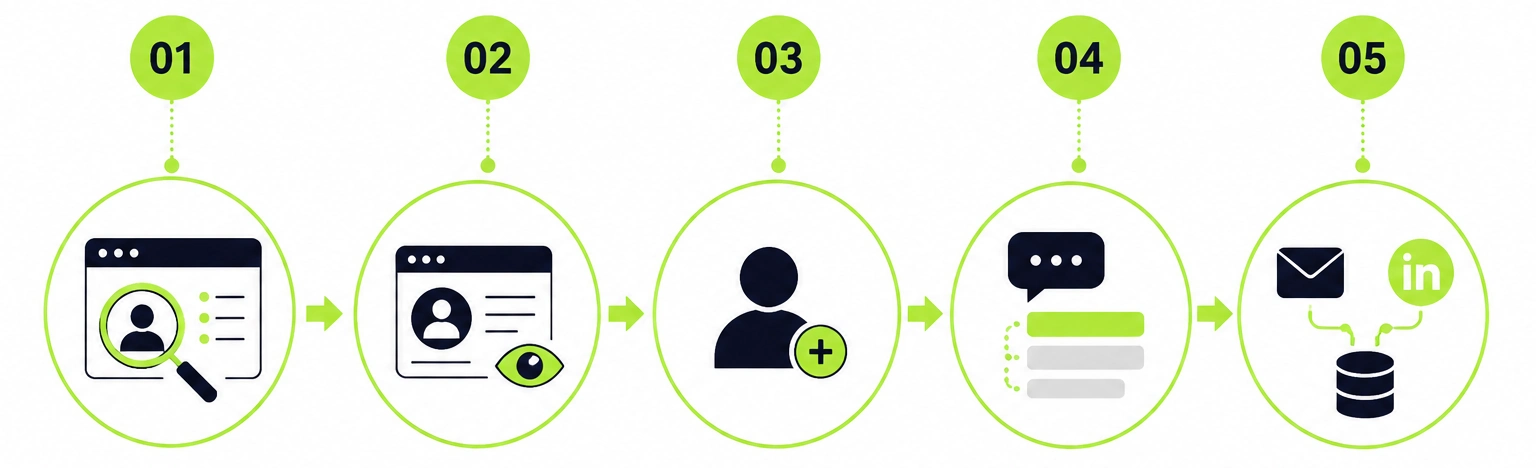
LinkedIn automation works through a five-stage workflow. A tool targets an audience, visits profiles, sends connection requests, queues follow-up messages, and stops the moment someone replies. Every action runs at a controlled pace with randomized delays to mimic human behavior.
Most guides stop there. This one goes further, covering the mechanics of each stage, the technical difference between tool types, how AI fits into modern outreach, and a side of this topic most posts skip: why the majority of LinkedIn automation content stays invisible to Google even when the writing is solid. If you are new to the topic, start with what LinkedIn automation is and how it fits into B2B lead generation before continuing here.
The Five Stages of LinkedIn Automation
Every tool, regardless of price or brand, runs on the same core workflow. The stages are sequential, and each one feeds into the next.
Stage 1: Lead Scraping and Audience Targeting
The workflow starts by ingesting a target list. You run a LinkedIn search with specific filters such as industry, job title, company size, and geography, or import a list directly from Sales Navigator. Some tools also pull from LinkedIn Groups, event attendees, or people who engaged with a specific post.
Advanced tools enrich these profiles by finding verified business email addresses alongside the LinkedIn data, which enables multi-channel outreach later in the sequence.
Stage 2: Automated Profile Views
Before sending a connection request, the tool visits each prospect's LinkedIn profile. When someone views your profile, LinkedIn sends them a notification. Roughly 20 to 30 percent of people view your profile back.
This creates a moment of awareness before your connection request arrives. Prospects who have already noticed your profile are meaningfully more likely to accept the incoming request. It functions as a warm-up signal with no message required.
Stage 3: Connection Requests
The tool sends a connection request within the account's daily limit. When a note is included, modern tools pull dynamic variables from the prospect's profile to make it specific rather than generic. The quality of this note directly affects your acceptance rate. For templates that consistently get accepted, LinkedIn connection message templates with tested examples cover what works across different industries and use cases.
Most platforms cap requests at 20 to 40 per day for established accounts. New accounts should start lower, around 10 to 15 per day, and scale up gradually over the first 90 days.
Stage 4: Follow-Up Message Sequences
Once the connection is accepted, a drip sequence begins. The tool queues messages spaced 2 to 7 days apart, each firing at a randomized time during business hours in the prospect's local time zone.
The sequence stops the moment the prospect replies. This is called reply detection and it is the single most important feature a LinkedIn automation tool can have. A sequence that continues after a reply destroys the conversation and the relationship.
Stage 5: Multi-Channel Expansion
Advanced tools search for the prospect's verified business email after a connection is made. If found, a parallel email sequence runs alongside the LinkedIn follow-ups, creating multiple touchpoints without requiring the prospect to share their email directly.
At the same time, reply data, connection status, and message history push automatically to your CRM, keeping the full outreach picture in one place.
Cloud-Based vs Browser Extension Tools
This is the most consequential technical decision when choosing a LinkedIn automation tool. The architecture determines your detection risk, campaign reliability, and account safety.
Cloud-Based Tools | Browser Extension Tools |
Run on remote servers with dedicated IP addresses | Run inside your Chrome browser from your personal IP |
Operate 24/7 — laptop does not need to stay on | Require your browser to stay open and your computer on |
LinkedIn sees consistent, stable activity from a fixed source | LinkedIn sees fluctuating patterns from a home network |
Multi-account management from one dashboard | Difficult to coordinate safely across team accounts |
Lower detection risk for consistent daily campaigns | Higher detection risk at any meaningful campaign volume |
For B2B teams running campaigns consistently, cloud-based is the correct choice. Browser extensions work for occasional low-volume outreach but are not built for reliable daily pipeline generation.
How AI Fits Into Modern LinkedIn Automation
The AI Overview for this query specifically highlights AI-powered personalization as a defining feature of modern tools. It is worth explaining concretely.
Modern automation tools integrate with AI models to generate context-specific icebreakers for each prospect. Instead of a generic opening line, the tool pulls the prospect's most recent LinkedIn post, their recent job change, or a company announcement and generates an opening tailored to that specific person.
Tools like Clay and Trigify feed enriched prospect data into automation platforms before campaigns launch, enabling this level of personalization at scale without manual research per contact.
This serves two functions. First, messages with genuine contextual relevance consistently produce higher reply rates. Second, messages that vary naturally do not trigger LinkedIn's spam detection the way repeated templates do.
The Safety Architecture
LinkedIn explicitly prohibits third-party automation tools in its User Agreement. Every credible tool builds a safety layer around three behaviors to keep accounts in good standing.
Randomized delays. Actions fire at irregular intervals, not precise ones. A tool sending messages every 4 minutes looks scripted. A tool sending at 3, 9, 14, and 6-minute gaps looks human.
Daily and weekly caps. Most platforms default to 100 connection requests per week in line with LinkedIn's pattern detection thresholds. You can reduce this number but should never override it upward.
Business hours scheduling. Campaigns run only during business hours in the prospect's local time zone. Activity at 2 am is an immediate flag. Activity spread naturally between 8am and 6pm is not.
These limits are not suggestions. Any tool that lets you push past safe thresholds without a warning is a risk to your account.
What Google Actually Sees When It Crawls LinkedIn Automation Content
This is the section most "how it works" posts skip entirely. And it directly explains why many LinkedIn automation companies publish strong content that almost nobody finds organically.
Many automation tool websites use JavaScript-heavy frameworks to render their blog content on the client side. When Googlebot crawls these pages, it receives an HTML shell with no readable text. The blog posts load only after JavaScript executes in the browser, which Googlebot does not reliably wait for.
The result is that companies with technically accurate, detailed content about LinkedIn automation rank poorly because Google never indexed what they wrote. The problem is not content quality. It is a rendering problem.
What Google Looks for Beyond Rendering
When a page is properly server-side rendered, Google can index every word and structured data tag on the first request. Beyond that, Google evaluates four additional signals for this content category:
Named authorship. A real person with a verifiable professional profile writing about automation signals, experience, and Expertise in E-E-A-T.
Structured data. A blog posting schema with author, publish date, and publisher makes content machine-readable and eligible for enhanced SERP features.
Content freshness. Automation tools change frequently. A post updated in the current year outperforms one last touched two years ago.
Internal linking. Blog posts linked to related posts and product pages build topical authority signals over time.
What a Well-Structured Campaign Looks Like
A B2B sales rep targeting SaaS founders in the US sets up a Sales Navigator list of 500 matching profiles. The tool visits each profile over 3 days, then sends connection requests at 30 per day with a one-line personalized note.
Over 2 weeks, roughly 35 to 40 percent accept the connection. A two-message follow-up sequence begins after each acceptance. The first message lands 2 days later with a relevant question or insight. The second arrives 4 days after that if no reply. All replies route to the rep's inbox and the sequence stops automatically.
Result: 175 to 200 new connections, 30 to 50 replies, and a pipeline of qualified conversations from a 3-week campaign that ran with minimal manual input. The manual work was the initial setup and the reply conversations.
Leadseeder runs exactly this workflow out of the box, with cloud-based execution, automatic reply detection, and multi-account support for agencies managing multiple client campaigns. Start a 7-day free trial to see how a properly structured campaign runs.
Frequently Asked Questions
How does LinkedIn automation work?
LinkedIn automation runs through five stages: audience targeting, automated profile views, connection requests, follow-up sequences, and multi-channel expansion. Cloud-based tools execute these stages from remote servers using randomized delays and daily caps to reduce account risk.
Is LinkedIn automation illegal?
No. It violates LinkedIn's Terms of Service, which means aggressive usage can result in account restrictions or bans. Tools that enforce safe daily limits and randomized delays reduce this risk significantly. The majority of B2B teams using automation within safe parameters operate without account issues.
How do I get 500 LinkedIn connections fast?
Run a targeted automation campaign using LinkedIn search filters or Sales Navigator. Define a specific ICP, write a relevant one-line connection note, and run the campaign at 30 to 40 requests per day. At a 35 percent acceptance rate, 500 connections take approximately 5 to 6 weeks at safe daily volumes.