Most LinkedIn accounts don't get restricted because they use automation. They get restricted because they don't understand what LinkedIn actually monitors.
LinkedIn's detection system doesn't work on a simple volume limit. It tracks your behavioral baseline over time, and flags accounts when their activity deviates sharply from their own history. That one distinction changes everything about how you approach safety.
This guide covers what actually triggers restrictions in 2026, the warmup ramp that keeps accounts clean, and what to do if LinkedIn flags your profile. If you're still setting up cloud-based LinkedIn automation software for the first time, start there before working through the safety layer here.
The Misconception That Gets Accounts Banned
The common assumption is that automation itself is the problem. It isn't.
Data from agencies running LinkedIn automation campaigns across dozens of accounts points to something counterintuitive: accounts using properly configured cloud-based tools face lower restriction rates than accounts doing manual outreach inconsistently. Switching IPs while traveling, logging in from multiple devices, and sending irregular volume bursts trigger the same detection systems as automation.
LinkedIn is looking for unnatural patterns, not software specifically. The question is whether your activity looks like a consistent, professional user of the platform.
What LinkedIn Actually Monitors
LinkedIn's detection system evaluates three layers of activity, not just raw volume numbers.
Behavioral Baseline
Every account builds a history of normal activity over time. LinkedIn tracks this internally as your activity baseline. If your account typically sends 5 connection requests a day and you suddenly jump to 50, the system flags the deviation from your baseline, not the absolute number.
This is why warmup matters even at low volumes. You can't go from zero to full campaign speed without a ramp-up period. The baseline doesn't exist yet.
Acceptance Rate as a Risk Signal
If fewer than 30 to 40 percent of people accept your connection requests, LinkedIn reads your targeting and messaging as unwanted outreach. When your acceptance rate drops below that range, your sending capacity gets reduced automatically, often well below standard limits, even if you haven't exceeded any volume caps.
Better targeting is the correct response to a low acceptance rate. Reducing volume without fixing the audience or message doesn't solve the problem.
Timing Patterns
Real people don't use LinkedIn at perfectly consistent intervals. A tool that fires one action every 3 minutes from 9 am to 5 pm creates a pattern that doesn't exist in real human behavior. LinkedIn's system recognizes it.
Randomized delays between actions, not uniform ones, are what make automated activity look like human activity.
Safe Activity Limits in 2026
LinkedIn doesn't publish official caps. Based on data from tools running campaigns across thousands of accounts, here are the operating ranges for established accounts (90+ days old). These are ceilings to stay well below, not targets to hit.
Action | Free Account | Sales Navigator / Premium |
Connection requests | 50 to 80 per week | 100 to 150 per week |
Direct messages (1st degree) | 100 per day | 150 per day |
Profile views | 100 per day | 250 to 500 per day |
InMail | Not available | 50 per month (Sales Nav) |
New accounts under 90 days old should cut these figures in half and scale gradually over 3 to 4 weeks.
Keep pending connection requests under 500 at all times. Clear unanswered requests every 14 days. A large pending backlog is a standalone flag that tells LinkedIn's system your requests aren't being accepted, which it interprets as spam-like behavior.
The Five Triggers That Actually Get Accounts Restricted
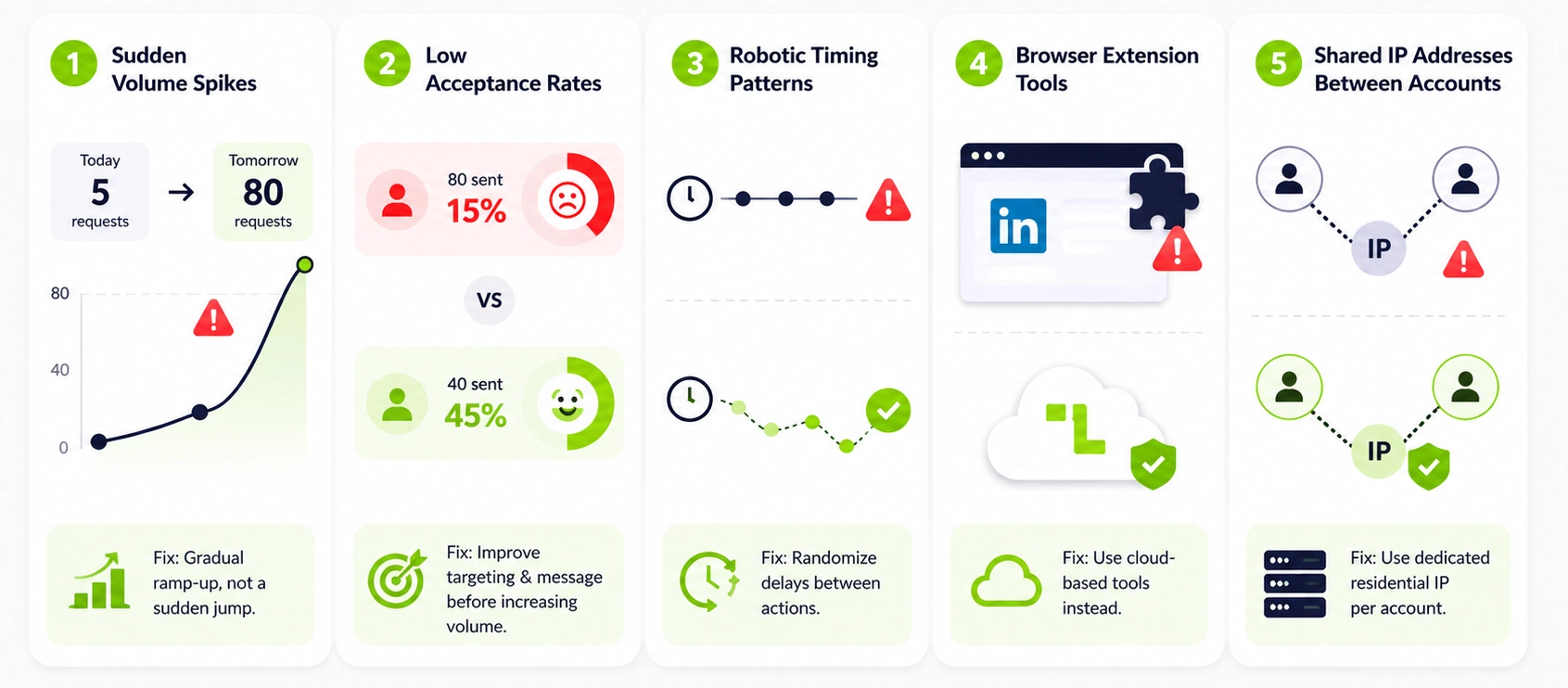
1. Sudden Volume Spikes
If your account sends 5 connection requests today and 80 tomorrow, the spike itself triggers a flag, regardless of whether 80 is within the weekly limit. LinkedIn compares current activity to your historical baseline. Any sharp deviation gets elevated scrutiny.
The fix is a gradual ramp-up, not a lower absolute volume. See the warmup section below for the exact schedule.
2. Low Acceptance Rates
Sending 80 connection requests a week with a 15 percent acceptance rate is more dangerous than sending 40 with a 45 percent rate. LinkedIn's system treats low acceptance as evidence that your outreach is irrelevant or unwanted.
When your acceptance rate drops, fix your targeting and your message before increasing sends. Volume is not the variable to adjust first.
3. Robotic Timing Patterns
Perfectly even intervals between actions are a dead giveaway. Humans scroll, get distracted, come back later. If your tool fires one message every 4 minutes without variation, that pattern doesn't exist in real human behavior, and LinkedIn's detection layer knows it.
Tools that randomize delays between each action in the sequence are meaningfully safer than those running on fixed intervals.
4. Browser Extension Tools
Browser extensions run inside your Chrome browser and inject scripts directly into LinkedIn's pages. LinkedIn's client-side scripts can detect this injection. According to data across multiple platforms, extensions carry significantly higher detection risk compared to cloud-based tools, with some estimates putting the difference at 60 percent or more. Understanding the five-stage outreach workflow that cloud-based tools use explains why the infrastructure architecture matters as much as the volume settings.
5. Shared IP Addresses Between Accounts
If two LinkedIn accounts operate from the same IP address, LinkedIn can link them. One account gets flagged, and the restriction can cascade to the second. Each account needs its own dedicated residential proxy.
Datacenter IPs from providers like AWS or Google Cloud are recognized as bot signals and carry substantially higher risk. Residential proxies that rotate per-account are the correct infrastructure for running multiple accounts safely.
The 4-Week Account Warmup Ramp
This is the setup most guides skip, and it is the most reliable way to prevent restrictions on new accounts. You cannot run automation at full volume from day one without triggering a baseline violation.
Week 1: Manual Only
No automation. Log in daily, scroll the feed, and leave 2 to 3 comments on industry content. Send 3 to 5 connection requests manually to people with mutual connections. The goal is establishing a behavioral baseline that LinkedIn recognizes as legitimate human activity before any tool touches the account.
Week 2: Light Automation Start
Turn on your tool at minimal settings. 5 to 8 connection requests per day. 5 to 10 profile views. A handful of messages to first-degree connections from week one. Vary send windows throughout the day rather than running everything in one fixed block.
Week 3: Gradual Scale
10 to 15 connection requests per day. 15 to 25 profile views. Start full outreach sequences but keep messages specific to each prospect. Monitor your acceptance rate every few days. If it drops below 40 percent, pause volume increases, and fix your targeting before pushing higher.
Week 4: Cruising Speed
15 to 25 connection requests per day, depending on account type and acceptance rate. Full sequences running with reply detection active. By this point, the account has 3 to 4 weeks of consistent activity history that LinkedIn recognizes as your normal baseline.
As long as you don't spike dramatically above this level, you're in the safe zone. The warmup isn't just about volume. Post engagement, comments, and profile updates all contribute to how LinkedIn assesses your account's legitimacy.
Message Rules That Keep You Safe
Use a minimum of 5 to 7 message variations. LinkedIn uses content hashing to detect repetitive outreach. Sending identical text to hundreds of prospects is flagged as spam behavior even at low volume. Create multiple versions of each template so the system never sees the same message twice in sequence.
Never include links in your first message or connection note. Links in initial outreach are one of the fastest ways to get flagged for phishing or spam. Lead with value, not a URL. Save links for later in the sequence after a reply comes in.
Keep connection request notes under 200 characters. Short, specific, and relevant to the individual. A note referencing something from the prospect's actual profile consistently outperforms generic openers. If you can't write something specific to the person, skip the note entirely.
Three Signals to Monitor Continuously
Acceptance rate. Check this every 3 to 4 days per active campaign. Below 40 percent means your targeting or messaging needs work. Below 30 percent means pause and fix before continuing.
SSI score (Social Selling Index). Available at linkedin.com/sales/ssi. LinkedIn uses this as a signal of account health. A score below 50 increases vulnerability to restrictions. Posting content, engaging with others' posts, and building genuine connections raise your SSI over time.
Pending connection count. Never let this exceed 500. Withdraw stale requests every two weeks. A large backlog signals that your requests aren't converting, which LinkedIn reads as poor-quality outreach.
What to Do If Your Account Gets Restricted
Most first restrictions are temporary, usually 24 to 72 hours. The notice from LinkedIn will tell you when access is restored.
Disconnect all automation tools immediately. Do not switch to a different tool and continue. That escalates a temporary restriction toward a permanent ban.
Wait the full restriction period plus 2 to 3 extra days. Do not attempt to log in during the active restriction window.
Return to the week one warmup levels when you come back. 3 to 5 manual connection requests per day. Light engagement only. Rebuild the baseline from scratch.
If LinkedIn requests identity verification, comply immediately. It is standard practice in 2026 and not a sign of permanent action. Accounts are typically fully restored after verification.
The recovery period takes 3 to 4 weeks of reduced activity. That is the cost of one restriction. Pushing through or ignoring the warning signs escalates it to a permanent ban, which costs far more in lost pipeline and time building a new profile.
Frequently Asked Questions
How do you not get banned on LinkedIn?
Warm up every new account manually for 30 days before enabling automation. Use cloud-based tools with dedicated residential IP addresses per account. Randomize action timing. Maintain message variations. Keep your acceptance rate above 40 percent. Never spike your volume suddenly. Those five practices remove the vast majority of restriction risk.
Is LinkedIn automation illegal?
No. It violates LinkedIn's Terms of Service, which means LinkedIn can restrict or ban your account if they detect it. It is not a legal violation. Operating within safe daily limits using a cloud-based tool with randomized delays makes the practical risk of detection low.
The Bottom Line
LinkedIn automation safety comes down to one principle: look like a consistent, active professional, not a tool firing actions at uniform intervals.
Gradual warmup, varied timing, personalized messages, strong acceptance rates, and dedicated IPs per account handle the risk. Get those five things right, and restrictions become a near-zero probability.
Leadseeder runs cloud-based campaigns with dedicated proxies per account, randomized delays, automatic reply detection, and per-sender daily limit controls built in. Start your 7-day free trial.